Include dependency graph for KeyUnitSensorClass.cpp:
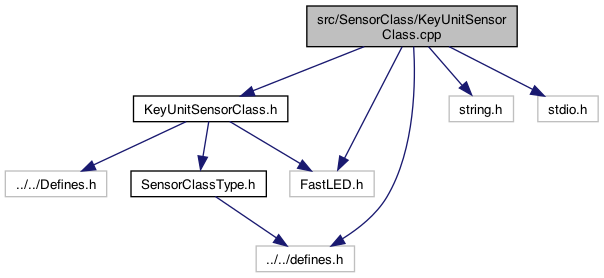
Go to the source code of this file.
Macros | |
| #define | USE_LED |
| #define | DATA_PIN 35 |
| port b More... | |
| #define | KEY_UNIT_GROVE |
| #define | KEY_PIN 1 |
| port b More... | |
| #define | USE_OPTION_1 |
Functions | |
| int | getDATA_PIN () |
| int | getKEY_PIN () |
Macro Definition Documentation
◆ DATA_PIN
| #define DATA_PIN 35 |
port b
8.20.24 The PIN map stuff is tricky, and I don't know how to do this except via configuration messages (or Compile defines). When using the M5Atom, the PIN Port (next to the power is: G19, G21,G22,G23,G25, G33) But if using the the PORT B or the IC-2, the pins are DATA_PIN 23, KEY_PIN 33 But the port out the back in DATA_PIN 26, KEY_PIN 32 HOW TO KNOW THIS ??? With the QRCode scanner, it's the port out the back If the
- See also
- https://shop.m5stack.com/products/mechanical-key-button-unit 8.21.24 .. quick test, will use factoryClockwise to change these for a test if factoryClockwise then it's plugged into the M5 (DATA_PIN 26, KEY_PIN 32) if not factoryClockwise then it's the extension .. (DATA_PIN 23, KEY_PIN 33)
Definition at line 60 of file KeyUnitSensorClass.cpp.
◆ KEY_PIN
| #define KEY_PIN 1 |
◆ KEY_UNIT_GROVE
| #define KEY_UNIT_GROVE |
Definition at line 96 of file KeyUnitSensorClass.cpp.
◆ USE_LED
| #define USE_LED |
Definition at line 38 of file KeyUnitSensorClass.cpp.
◆ USE_OPTION_1
| #define USE_OPTION_1 |
Function Documentation
◆ getDATA_PIN()
| int getDATA_PIN | ( | ) |
- See also
- https://github.com/FastLED/FastLED/blob/356a3794d9d2b027685a374715e32d0ee2ad3e9b/examples/SpecialDrivers/ESP/DriverTest/PlatformConfig.h#L37
- https://github.com/esphome/issues/issues/4501 the RGB pin 35
7.12.25
Definition at line 68 of file KeyUnitSensorClass.cpp.
◆ getKEY_PIN()
| int getKEY_PIN | ( | ) |
7.12.25
Definition at line 107 of file KeyUnitSensorClass.cpp.