#include <ChainButtonClassType.h>
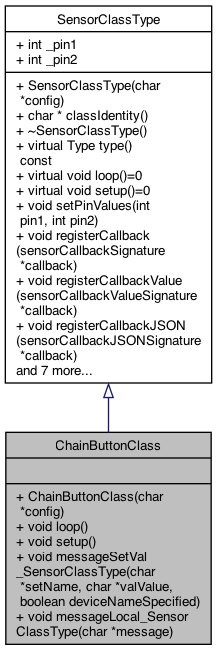
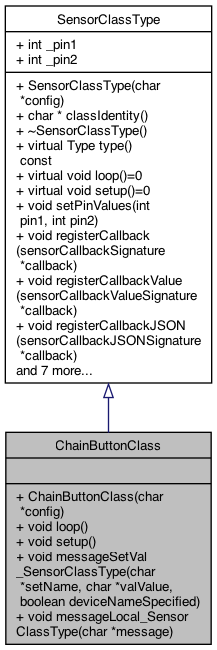
Public Member Functions | |
| ChainButtonClass (char *config) | |
| constructor More... | |
| void | loop () |
| Pure Virtual Function. More... | |
| void | setup () |
| Pure Virtual Function. More... | |
| void | messageSetVal_SensorClassType (char *setName, char *valValue, boolean deviceNameSpecified) |
| these are not initialized... More... | |
| void | messageLocal_SensorClassType (char *message) |
| 5.15.25 try a special command local to this class More... | |
 Public Member Functions inherited from SensorClassType Public Member Functions inherited from SensorClassType | |
| SensorClassType (char *config) | |
| char * | classIdentity () |
| ~SensorClassType () | |
| destructor More... | |
| virtual Type | type () const |
| virtual void | loop ()=0 |
| Pure Virtual Function. More... | |
| virtual void | setup ()=0 |
| Pure Virtual Function. More... | |
| void | setPinValues (int pin1, int pin2) |
| void | registerCallback (sensorCallbackSignature *callback) |
| void | registerCallbackValue (sensorCallbackValueSignature *callback) |
| void | registerCallbackJSON (sensorCallbackJSONSignature *callback) |
| void | callCallback (char *info, boolean flag) |
| call the callback More... | |
| void | callCallbackValue (char *info, int value) |
| call the callback More... | |
| void | callCallbackJSON (char *JSONString) |
| call the callback for JSON More... | |
| virtual void | messageSetVal_SensorClassType (char *setName, char *valValue, boolean deviceNameSpecified) |
| virtual void | messageSend_SensorClassType (char *sendValue) |
| virtual void | messageCmd_SensorClassType (char *cmdValue) |
| virtual void | messageLocal_SensorClassType (char *message) |
| 5.15.25 try a special command local to this class More... | |
Additional Inherited Members | |
| Public Attributes inherited from SensorClassType | |
| int | _pin1 = 0 |
| int | _pin2 = 0 |
| pin2 More... | |
| boolean | _pinsValid = false |
| 12.19.25 add ability to know which kind of SensorClass we are More... | |
Detailed Description
12.19.25 Add the 12.17.25 No Power. 1 tree down, HIGH winds last night, no flooding here, but valleys and roads bad extend the parser for different SensorKindEnum with different number of parameters and types (int vs str) There will be a setSensors (existing), and then a setM5Chain the new one.. it's own EPROM too the SensorKindEnum is what state we are holding. There will be state models behind each of these.
Definition at line 21 of file ChainButtonClassType.h.
Constructor & Destructor Documentation
◆ ChainButtonClass()
| ChainButtonClass::ChainButtonClass | ( | char * | config | ) |
constructor
library code M5Chain.h
2.11.26 token parser
Definition at line 19 of file ChainButtonClassType.cpp.
Member Function Documentation
◆ loop()
|
virtual |
Pure Virtual Function.
- See also
- https://www.w3schools.com/cpp/cpp_class_methods.asp 1.22.26 the buttons are numbered 0..n Long press and Short Press need defining for each button then what the button should do, eg. send MQTT message: eg. MatrixCell, 5 Basically we have a full programming language needed. This is exactly why the SMART Buttons are created, but calling them from here isn't easy. Instead we need MQTT messages (or internal messages, like feed the dog)
7.13.26 Bday party for qwinton today, he's 26 friday 17th
stores status
3.15.26 Stormy Weekend - 410 100's trees downed .. The challenge: If there is only 1 button (let's say the Joystick) physically used but in our demo - it's the 3rd button (physically). So the code here and elsewhere wouldn't know that. So what does "setup" and whad does "loop" do when the button definitions aren't correct. CASE: there is only 1 physical button, and it's a JoyStick. It would be nice to know that .. and I don't know how to know it's plugged in except if the CHAIN_OK state below .. let us know. THen there is a CHAIN_LINKER that says the button and button types ..
basically goes through the PHYSICAL list .. and figures out what button was pressed..
1.29.26 Rain finally this happens when it's unplugged without rebooting ... NOT AN ERROR really
NOTE maybe we kill the buttons .. let the user reboot if they HOT plug them in... set NULL
here is where the CHAIN LINKER links the chainUseStruct (our definitions) with the button found.
grab the correct chain use struct..
process this button . checks for NULL in function
TODO .. figure out how to pass these to the Joystick class..
get joystick values
get the quadrant of the x,y eg, left, top, right, bottom
2.7.26 (after my 68th bday w Laura Babe, 2.5.2026). see if the message is too fast ??
2.13.26 cold rain use thenew diff per quadrant
2.7.26 (after my 68th bday w Laura Babe). print out
try a threshold .. 2 for now..
1.24.26 process the button version .. not the x,y version
process this button . checks for NULL in function
3.15.26 Winter out there.. snow in hills NOTE: the though is if there is only 1 button and it's a joystick, then this code will run but the BUTTON won't be let's say '3' instead it will be '1' SO: the lookup for button1_based will fail if we say '1'. (actually it will find a BUTTON not a JOYSTICK) which would do something.. but not the JOYSTICK thing TODO: if only 1 physical button _devicenum == 1 THEN .. find the first "Joystick" button .. the buttonStruct doesn't have that knowledge .. BRIDGE TOO FAR .. OR could search for a pressKind that matches .. first match goes ..
1.29.26 Rain finally this happens when it's unplugged without rebooting ...
1.24.26 process the button version .. not the x,y version
grab the correct chain use struct..
process this button . checks for NULL in function
Implements SensorClassType.
Definition at line 192 of file ChainButtonClassType.cpp.

◆ messageLocal_SensorClassType()
|
virtual |
5.15.25 try a special command local to this class
Reimplemented from SensorClassType.
Definition at line 655 of file ChainButtonClassType.cpp.
◆ messageSetVal_SensorClassType()
|
virtual |
these are not initialized...
12.19.25 add ability to know which kind of SensorClass we are
- See also
- https://stackoverflow.com/questions/307765/how-do-i-check-if-an-objects-type-is-a-particular-subclass-in-c adding the messages as well 5.14.25 (Laura/Paul flying). 5.14.74 great Dead 8.28.23 Adding a way for others to get informed on messages that arrive for the set,val 12.27.23 support setName == "socket" 1.10.24 if deviceNameSpecified then this matches this device, otherwise for all. It's up to the receiver to decide if it has to be specified
adding the messages as well 5.14.25 (Laura/Paul flying). 5.14.74 great Dead 8.28.23 Adding a way for others to get informed on messages that arrive for the set,val 12.27.23 support setName == "socket" 1.10.24 if deviceNameSpecified then this matches this device, otherwise for all. It's up to the receiver to decide if it has to be specified
todo .. look for SM_MatrixcCell and hit the button (single press) the matching 1..n 1.24.26 see if SM_MatrixCell, num .. then run the SINGLE_PRESS of that cell 1..n
1.25.26 Football day .. Seahawks vs Rams for superbowl .. Not supporting SM_MatrixCall (since we aren't a matrix YET ...)
the MatrixCell is actuall row.col .. but we will piggy back on that.. NFL Games, Seahawks-Rams, Patriots-Broncos need tu spport <name> l[row [.col]]
1.25.26 Cold Clear Mt, Puppies in garage eating my toes, support new SM_ChainButton, button, pressKind syntax set: SM_ChainButton, val: button.presskind (or just button [.presskind])
which loop, button, then pressKind
process this button (for testing will be button 2 .. turn on/off the lights)
2.9.26 after Superbowl win, and L Vonn epic crash support the new message for processing a SMARTDefn of a set/val {"set":"smartDefn","val":"uuid.flownum(set, val, dev)"}
2.9.26 works.. but there might be multiple with same SMART address OOPS .. the getChainButtonStructSMART .. looks for matches .. this should be returning multiple BUT for now .. only the first one. NOTE: this is a chain button with a smart address .. which can be re-bound through this message..
2.11.26 nice day. Mt Looking great the valValue could be the http version, or alerady a semantic marker UUID.flow
parse full value ..
inform the CHAIN buttons that DOCFOLLOW is set to the value specified ... TODO: think about the Group as a parameter to have kinds of "DOCFOLLOW" not all the same sm is still transient storage
Reimplemented from SensorClassType.
Definition at line 799 of file ChainButtonClassType.cpp.

◆ setup()
|
virtual |
Pure Virtual Function.
setup the buttons
flag returned
chain status
register the pin used 7.12.26 Ashton's birthday 12 register so get error before doing the being or other crashable ops
2.7.26 (after my 68th bday w Laura Babe, 2.5.2026). see if the message is too fast ??
if the chains are ready ... This first loop counts the number of devices, and then creates a devices list of that number.. It would also know the type of the device ..
create storage for the NUM devices (acutal devices)
this fills in the devicesList structures .. including the device_type (CHAIN_KEY_TYPE or CHAIN_JOYSTICK_TYPE_CODE)
this is our list but we don't know the button types yet the devicesList is global of the PHYSICAL buttons plugged in..
draw on the RGB colors
setup the trigger interval .. their API
setup the CHAIN REPORT MODE . their API
draw colors
configure the double click time
setup the report mode
Implements SensorClassType.
Definition at line 450 of file ChainButtonClassType.cpp.

The documentation for this class was generated from the following files:
- src/SensorClass/ChainButtonClassType.h
- src/SensorClass/ChainButtonClassType.cpp