#include "M5Atom_NoModuleClass.h"#include "../SensorClass/SensorClassType.h"#include "../SensorClass/KeyUnitSensorClass.h"
Include dependency graph for M5Atom_NoModuleClass.cpp:
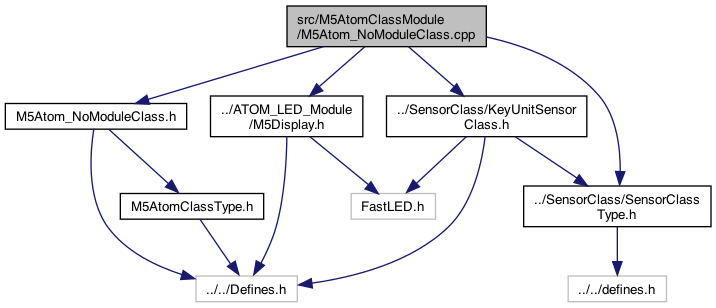
Go to the source code of this file.
Macros | |
| #define | USE_OPTION_1 |
Functions | |
| void | M5AtomCallback_M5AtomNoModule (char *parameter, boolean flag) |
| a pointer to a callback function that takes (char*) and returns void More... | |
Variables | |
| TimerDelayClass * | _timerDelayClass_M5NoModuleClass |
| create instance of the timer class More... | |
| float | _delaySeconds_M5NoModuleClass_setting = 1.5 |
| default .. this could be set via Preferences (TODO) More... | |
| KeyUnitSensorClass * | _KeyUnitSensorClass_M5AtomNoModule |
| keyUnitSensorClass object for the BUTTON More... | |
Macro Definition Documentation
◆ USE_OPTION_1
| #define USE_OPTION_1 |
Function Documentation
◆ M5AtomCallback_M5AtomNoModule()
| void M5AtomCallback_M5AtomNoModule | ( | char * | parameter, |
| boolean | flag | ||
| ) |
a pointer to a callback function that takes (char*) and returns void
feed always (done after the code below..)
send status after power on/off change..
Definition at line 35 of file M5Atom_NoModuleClass.cpp.
Here is the call graph for this function:

Here is the caller graph for this function:

Variable Documentation
◆ _delaySeconds_M5NoModuleClass_setting
| float _delaySeconds_M5NoModuleClass_setting = 1.5 |
default .. this could be set via Preferences (TODO)
Definition at line 29 of file M5Atom_NoModuleClass.cpp.
◆ _KeyUnitSensorClass_M5AtomNoModule
| KeyUnitSensorClass* _KeyUnitSensorClass_M5AtomNoModule |
keyUnitSensorClass object for the BUTTON
Definition at line 32 of file M5Atom_NoModuleClass.cpp.
◆ _timerDelayClass_M5NoModuleClass
| TimerDelayClass* _timerDelayClass_M5NoModuleClass |
create instance of the timer class
TODO.. have only 1 of these included in build, but change the callback That requires that ATOM be a class, OR there is a single Sensor but different callback..
Definition at line 26 of file M5Atom_NoModuleClass.cpp.